


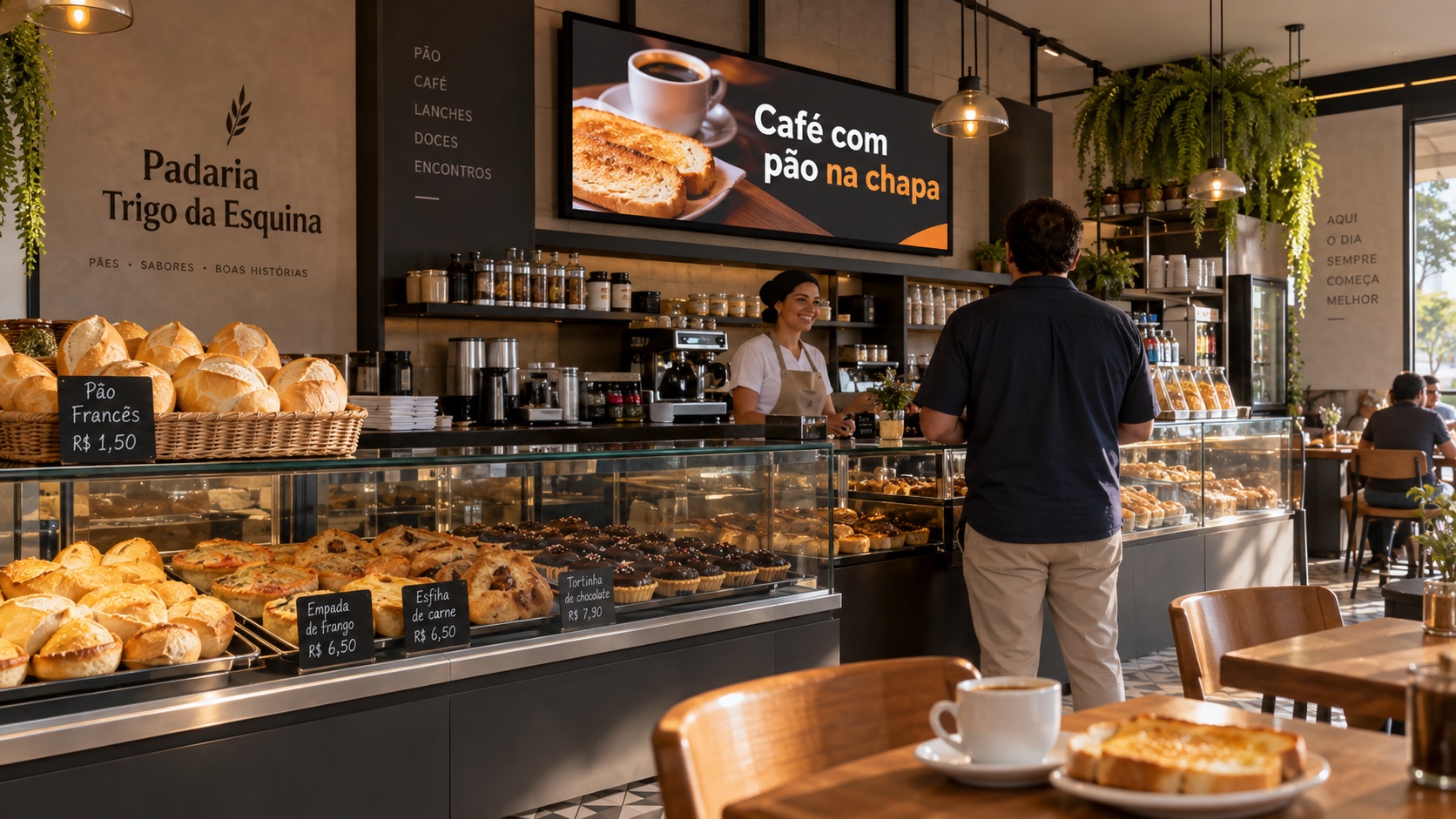
The bake is done, but the fresh-bread notice is still on the screen. The kitchen has already started serving lunch, but the coffee combo still occupies the best slot. Later, skewers and the evening plate arrive — while the screen keeps looping the same sequence.
The problem does not start with photo quality. It starts with the lack of a schedule that follows what happens at the counter.
A useful schedule answers four questions: what to show, when the message makes sense, how often it comes back, and who pulls it when it no longer holds. “Morning, lunch, and afternoon” can help organize hours, but it does not answer all of that.
We will build that schedule for Padaria Trigo da Esquina, a fictional neighborhood bakery in Brasília that also serves meals. Beyond bread, savory snacks, and confectionery, it offers coffee, grill and tapioca options, lunch, and, late afternoon and evening, skewers with an evening plate. Pizza runs on nights the owner defines. She starts with one screen facing people waiting to be served.
The business, the people, the difficulties, and every number in the example are hypothetical. This is not a real customer, nor a promise of higher sales, less waste, or savings on print.
The bakery already has a schedule. It is in the oven.
Before you think about images, write down the events that change the conversation with the customer.
The first bake reaches the counter. The coffee line forms. The kitchen releases lunch. After service, sweets are still in the case. Late afternoon, skewer prep begins. Closing approaches and the kitchen stops taking new orders, even if the counter keeps serving.
Each event can open a communication window. The screen presents an option at the moment it can be fulfilled; it does not create stock or guarantee that anyone will buy it.
Start with two windows someone can actually own. If nobody can confirm the bake and pull the notice, leave “just out of the oven” for later. A smaller schedule with true messages is a better start than a full agenda of forgotten exceptions.
Planned time is not product confirmation
A bake planned for 7 a.m. can run late or sell out quickly. Scheduling a notice for 7 a.m. confirms neither of those conditions.
Separate the planned window from the authorization to display. The person on the oven says the bread has arrived; the person in charge of the screen activates the creative. It comes down when the product is gone or when the short agreed window ends, whichever comes first.
If that check does not fit service, use a message less tied to the exact moment, such as “Ask at the counter about the next bake.” Do not turn an expectation into a claim of availability.
Lunch released is an event; noon is only a clock time
In the example bakery, lunch deserves its own window. The creative only goes up after the kitchen confirms service has started. If the highlight is fried fish, the photo and copy must match the option available that day. Do not leave yesterday’s dish advertised for lack of a new image.
For a simpler routine, use “Lunch being served — see today’s options,” without listing dishes that may sell out at different times. When service ends, the creative comes down and the schedule returns to the base or to a confirmed confectionery highlight.
The same logic applies at night: “Skewers with evening plate” depends on the kitchen still taking those orders and on the advertised sides being available. Order cutoff can happen before the bakery closes. Pizza only enters on nights its prep was confirmed; it does not need to compete with every other offer at once.
What stays on the screen between windows?
The schedule needs base content: a sequence that still makes sense when no highlight is active.
At Trigo da Esquina, the base has two creatives: bakery identification with a photo of its breads, and an invitation to ask at the counter about cake orders. Neither promises a product available right then, a promo price, or delivery on an unconfirmed timeline.
That base is not abandoned. The owner checks whether the photos still represent the products and whether the bakery still accepts the orders being advertised.
Also define how you return to it. Ending a highlight must not leave an old promotion as the fallback. Test the transition on the screen, including when no other campaign is planned.
Few creatives, with maintenance work in plain sight
You do not need one artwork for every hour of the day. To cover this example’s routine, the set has seven creatives, reused across windows. They can be prepared gradually, starting with the base and two highlights:
- Bakery identification with a bread photo — base content.
- Invitation to ask about orders — base content.
- Bake notice — used only after confirmation.
- Coffee with grilled bread — for the period that option is being served.
- Tart from the display case — to highlight the product when available.
- Lunch being served — without locking to a dish that changes daily.
- Skewers with evening plate — only while the kitchen accepts those orders.
That is seven files for the full schedule, not seven new files every day. Tapioca can replace grilled bread on the coffee creative; pizza can replace the evening highlight. Each alternative needs its own version, even on the same template. A festa junina campaign can also temporarily replace a highlight. Changing product, condition, or price still requires a review and a new version of the creative.
In our fictional bakery, Helena, the owner, prepares the material after closing the till. She photographs products on her phone, near a window, with side light and a tidy background. She avoids shooting through glass when it creates reflections. The portion in the photo should match what will be served.
A good photo solves the product image. Price, name, validity, and bakery identity need graphic composition: readable type, contrast, and space. Helena uses an editable template with fixed slots for photo and text; if she cannot build it, that first template is a task she can hire out. The cost and time of that creation do not disappear because the display is digital.
Before publishing, she views the creative from the customer’s position. If she has to step closer to read, she shortens the copy or enlarges the type. She does not try to put the whole menu in one image.
What if there is one screen at the counter and another in the window?
The two positions ask for different readings. Someone waiting at the counter can see a side suggestion; someone passing on the sidewalk needs to grasp the product and the invitation to come in quickly.
Reusing the photo does not remove the need to adapt. One landscape screen and one portrait screen can turn seven creatives into as many as fourteen files to check, before product alternatives. Even with the same orientation, copy, framing, and contrast may need to change.
In the example, Helena postpones the second screen until she can keep the first. When she adds it, the schedule will carry a destination label: counter or window. Every price change will need to be checked across all active versions.
Price on the screen: only when you can keep it correct
A stable combo with a well-defined composition is easier to maintain than an offer whose price changes with every restock. To advertise “coffee with grilled bread,” you need to make clear which coffee and which portion are part of the offer.
At lunch, the creative must respect how the business charges: by the kilo, by the plate, or per person. Do not use a loose number that leaves that unit ambiguous. On the evening plate, say which sides are included and whether the skewer is part of the price. These are decisions of the fictional operation, not a real venue’s menu or price list.
At Trigo da Esquina, Helena approves the amount and the cashier compares the creative with the price that will be charged before it goes live. If the amount changes, the review includes every file and playlist that uses the offer.
When that maintenance does not fit the routine, the creative can highlight the product without a price, leaving the check to the menu or to service. That does not replace the price information the business must provide through proper channels; it only avoids duplicating information nobody can keep accurate on the screen.
“While supplies last” also does not fix everything. The phrase does not make an ad useful once the item is gone. Someone is still responsible for pulling it.
Weekends and special dates have another routine
Do not automatically copy Friday onto Saturday. Watch your own bakery’s orders and service: Does coffee run longer? Does lunch change? Are there more cake pickups? Are pizza and skewers served on the same days and hours?
If the weekend concentrates your business’s revenue, it deserves its own schedule. That has to come from your records, not from a rule applied to every bakery.
Special dates also have distinct stages. At Easter, there may be an ordering phase and a pickup phase. On Mother’s Day, the deadline to order a cake ends before the celebration. During festa junina, the creative depends on the products that actually entered production.
Record the order cutoff, not only the day of the celebration. After that limit, replace the invitation to order with information that can still be fulfilled. A seasonal campaign can take the place of an existing creative without growing the sequence indefinitely.
The Trigo da Esquina schedule — after the first stumble
On the first attempt in this fictional scenario, Helena creates too many highlights. The cashier does not know which ones can come down, an expired promotion runs for a week, and the bread photo, shot against the light, looks dark.
She shrinks the schedule, retakes the photo, and agrees on a rule: Helena prepares and approves; whoever is on the till confirms availability and pulls the highlight. If that person cannot own the task, the highlight does not go up. At shift change, they say what is still active.
The schedule below is the simplified plan. Times and durations are illustrative choices, not universal recommendations. Here, cycle means one full pass through the sequence on display.
| Event and planned window | What to show | Planned frequency | Minimum creatives |
|---|---|---|---|
| No active highlight, during opening hours | Bakery identification and order inquiry | Alternate the two creatives, 10 seconds each | 2 base |
| Confirmed bake, planned between 7 a.m. and 8 a.m. | Notice of bread just out of the oven | Once per cycle, between the two base creatives; 10 seconds | 1 bake |
| Coffee line, observed between 7 a.m. and 9 a.m. | Coffee with grilled bread, if prep is available | Once per cycle, between the two base creatives; 10 seconds | 1 coffee |
| Kitchen releases lunch, planned between 11 a.m. and 2 p.m. | Lunch being served; see today’s options | Once per cycle, between the two base creatives; 10 seconds | 1 lunch |
| Case with tarts available, between 2 p.m. and 5 p.m. | Photo and name of the tart | Once per cycle, between the two base creatives; 10 seconds | 1 sweet |
| Skewer and evening-plate orders begin, planned at 5 p.m. | Skewers with evening plate, as available | Once per cycle, between the two base creatives; 10 seconds | 1 evening |
| Last hour before close at 9:30 p.m.; kitchen stops orders at 9 p.m. | Keep the evening creative only until order cutoff; then base | Same cycle while the highlight is valid; then alternate the base | Reuse evening and base |
| Saturday, during confirmed coffee service | Coffee with grilled bread | Once per cycle, between the two base creatives; 10 seconds | Reuse the coffee creative |
To start, only one highlight is active at a time. During the coffee window, a confirmed bake takes that slot for up to 15 minutes. Then coffee returns if it is still being served; otherwise, only the base returns. The bake notice comes down before that limit if the bread sells out. That way overlapping windows have an explicit decision.
With two base creatives and one highlight at 10 seconds each, the planned cycle lasts 30 seconds. That describes the sequence, not how many people will pay attention. Helena needs to watch on-site reading before keeping that pace.
Frequency is not enough. The pull agreement sits next to the schedule:
| Content | Who checks | When to pull or review |
|---|---|---|
| Base | Helena | Check at opening and when the order service changes |
| Bake | Cashier, after notice from whoever is on the oven | When it sells out or after 15 minutes; a new run needs a new confirmation |
| Coffee with grilled bread | Cashier | When prep ends, a component is missing, or the price changes |
| Lunch | Cashier, after kitchen confirmation | When service ends; if a specific dish is on the creative, also when it sells out |
| Tart | Cashier | When the product sells out or the planned window ends |
| Skewers with evening plate or pizza alternative | Cashier, after kitchen confirmation | When new orders stop, an advertised item is missing, or the price changes |
| Seasonal campaign, when there is one | Helena defines; cashier checks | At the order cutoff or earlier if capacity is gone |
Near closing, there is no obligation to invent a discount. If there is no suitable product to highlight, the screen stays on the base until service ends.
The test for this first version is operational: Does the message match the counter? Does the cashier know how to pull it? Can Helena keep the files? A schedule that passed the playback test can still fail those three questions.
From schedule to execution
With those decisions made, Lucimark becomes the tool to organize media, build playlists, and assign content to the screen. The schedule defines what should happen; publishing and checking on the device verify that it did. Do not assume the system knows when a bake came out or a product sold out: in this example, that confirmation is human.
The step-by-step for upload, assembly, and assignment is in the media, playlists, and screens tutorial. To prepare the device, use the first-screen guide, which also covers testing in the browser.
Before using it in service, check each highlight’s entry and exit, the return to base, and readability from a distance. A change that was sent should not be treated as done without verifying what appears on the screen.
Copy this schedule and fill in two windows
Choose first the events that are already part of your routine. Do not try to advertise the whole menu at once.
Screen/location: ______ · Creative owner: ______ · Owner during service: ______
| Operation event | Planned window and required confirmation | What to show | Frequency and duration | Minimum creatives and reuse |
|---|---|---|---|---|
| Base content | ______ | ______ | ______ | ______ |
| First window | ______ | ______ | ______ | ______ |
| Second window | ______ | ______ | ______ | ______ |
| Weekend or special date | ______ | ______ | ______ | ______ |
For each highlight, also complete:
- Who confirms product and price: ______
- When it stops holding, even if the clock window has not ended: ______
- Who pulls it and who takes over at shift change: ______
- What replaces it and which highlight wins if windows overlap: ______
- On which screens and versions the change must be checked: ______
Fill in the base and two windows before creating new artwork. If a row has no owner or exit condition, it is not ready to go live.
The screen should follow the counter, not force the counter to explain an outdated message. If you want to talk about how to run this schedule, talk to Lucimark.
About this example
This is an editorial and operational planning exercise, not a deployment case study. The seven creatives, the mix of products and services, the hours, the frequency, and the problems narrated were invented to make the decisions concrete. They do not represent a current menu, operational data, or results from a real bakery.
Platform usage references are the Studio tutorial and the first-screen install guide. Adapt the schedule to your production, service, and ability to maintain it.